+91 9154112233
+91 9154000111
info@qedgetech.com
QEdge Technologies is the Leading and Best training institute for DevOps & Multi-Cloud (AWS + Azure) in Ameerpet, Hyderabad. We have strong record of providing placement assistance in global MNC’s.
DevOps & Multi-Cloud with MLOps is in demand.
DevOps Engineering is rated as one of the happiest professions.
DevOps has a great career path.

| Course | Date | Timings | Duration | Trainer | Training Location | Online Zoom Id |
|---|---|---|---|---|---|---|
| Devops MultiCloud with AI | 27-Oct-2026 | 08:00 AM - 09:30 AM | 4 Months | Mr. Kiran | Ameerpet Online | Zoom Id: 99020189681 |
We provide job oriented DevOps Training in Hyderabad with best infrastructure for both classroom and online training. We offer Online Training to Global students as well like from US, UK, Europe, Australia.
DevOps is the culture in software development, in which Software developers combine with the operations team to ensure that the applications and services are delivered at high velocity and performs with a minimum number of problems.
This improves products at a faster pace than organizations using traditional software development and infrastructure management processes. In the competitive markets this speed enables the organizations to better serve their customers.
Development and operations teams are sometimes merged into a single team where the entire application life-cycle involves engineers, from development and test to deployment to operations, and develop a range of skills not limited to a single function.
Kindly, register with us for more information on course details. Our representative will get back to you soon.
Project Title: Continuous Integration Pipeline for Java Microservices
Project Summary: Designed and implemented a Continuous Integration (CI) pipeline to automate source code integration, build, code quality analysis, artifact management, and build notifications. The pipeline integrates GitHub with Jenkins for automated builds, performs Maven-based compilation and testing, analyzes code quality using SonarQube, stores versioned artifacts in Nexus Repository, and sends real-time build notifications through Slack, providing a streamlined and production-oriented CI workflow.
Tool Stack: AWS EC2, Ubuntu Linux, Git, GitHub, Jenkins, Apache Maven, Java, SonarQube, Nexus Repository Manager, Nginx, Slack, Shell Scripting, Visual Studio Code, GitHub Webhooks, SSH, Jenkins Pipeline (Groovy).
Project Title: Cloud-Native CI/CD Platform for Web Applications on AWS
Project Summary: Designed and implemented a complete cloud-native CI/CD pipeline that automates application build, code quality analysis, containerization, image management, and Kubernetes deployment on AWS. The project provisions infrastructure using Terraform, configures Jenkins Master-Slave architecture with Ansible, builds Docker images, pushes them to Amazon ECR, deploys applications to Amazon EKS using Kubernetes and Helm, integrates SonarCloud for code quality analysis, and enables monitoring with Prometheus and Grafana for production-ready application management.
Tool Stack: AWS EC2, Amazon EKS, Amazon ECR, Amazon S3, IAM, Terraform, Ansible, Jenkins, Jenkins MasterSlave Architecture, Git, GitHub, Docker, Kubernetes, Helm, Sonar Cloud, Apache Maven, Java, AWS CLI, kubectl, eksctl, Prometheus, Grafana, Linux (Ubuntu), Shell Scripting, Visual Studio Code, GitHub Webhooks
Project Title: DevSecOps CI/CD Pipeline for Buggy Web Applications on AWS
Project Summary: Designed and implemented an end-to-end DevSecOps CI/CD pipeline on AWS to automate infrastructure provisioning, code quality analysis, security vulnerability scanning, containerization, artifact management, and Kubernetes deployment. The project leverages Terraform for Infrastructure as Code (IaC), Jenkins for CI/CD automation, Sonar Cloud and Snyk for code quality and security scanning, Docker for containerization, Amazon ECR for image management, and Amazon EKS for orchestrating containerized applications, enabling a secure and production-ready DevSecOps workflow.
Tool Stack: AWS EC2, Amazon EKS, Amazon ECR, IAM, VPC, Terraform, Jenkins, Git, GitHub, Docker, Kubernetes, eksctl, kubectl, SonarCloud, Snyk, Apache Maven, Java, AWS CLI, Shell Scripting, Linux (Amazon Linux & Ubuntu), Visual Studio Code, GitHub Webhooks.
Project Title: Java Application Deployment using Azure DevOps Classic Pipelines
Project Summary: Designed and implemented a complete CI/CD pipeline for a Java-based Web Application using Azure DevOps Classic Pipelines. The project automates source code integration, Maven-based build, continuous integration, artifact generation, and automated deployment to Azure App Service. It demonstrates DevOps practices by integrating Azure Repos, Azure Pipelines, Release Pipelines, and Azure Web Apps to achieve seamless application delivery on the Azure cloud platform.
Tool Stack: Microsoft Azure, Azure Portal, Azure DevOps, Azure Repos, Azure Classic Build Pipeline, Azure Classic Release Pipeline, Azure App Service, Git, GitHub, Apache Maven, Java 17, Linux Hosted Agent (Ubuntu 22.04), Azure Resource Groups, Web App Service, Visual Studio Code.
Project Title: Modern CI/CD Pipeline for Java Applications using Azure DevOps YAML
Project Summary: Designed and implemented a modern CI/CD pipeline for a Java-based Web Application using Azure DevOps YAML Pipelines. The project automates source code integration, Maven-based build, application packaging, and deployment to Azure App Service on Linux. It leverages Azure Repos, Azure Pipelines, and Azure Web Apps to enable continuous integration, automated deployment, and streamlined application delivery following cloudnative DevOps practices.
Tool Stack: Microsoft Azure, Azure Portal, Azure DevOps, Azure Repos, Azure YAML Pipelines, Azure App Service (Linux), Azure Resource Groups, Git, GitHub, Apache Maven, Java 17, Apache Tomcat 10.1, Linux Hosted Agent (Ubuntu), YAML, Visual Studio Code.
Project Title: Cloud-Native Pipeline for Node.js Applications on Azure Kubernetes Service (AKS)
Project Summary: Designed and implemented a cloud-native end-to-end CI/CD pipeline for a Node.js Web Application using Azure DevOps. The project automates source code integration, code quality analysis with Sonar Cloud, infrastructure provisioning using Terraform, Docker image creation, container registry management with Azure Container Registry (ACR), and automated deployment to Azure Kubernetes Service (AKS). It also enables continuous monitoring through Azure Monitor and Log Analytics, providing a complete production-ready DevOps workflow on Microsoft Azure.
Tool Stack: Microsoft Azure, Azure DevOps, Azure Repos, Azure Pipelines (YAML), Azure Kubernetes Service (AKS), Azure Container Registry (ACR), Azure Monitor, Log Analytics Workspace, Terraform, Docker, Kubernetes, Sonar Cloud, Git, GitHub, Node.js, Azure CLI, Visual Studio Code, YAML, Linux, Azure Resource Manager (ARM), Azure IAM (RBAC).
Project Title: Cloud-Native Pipeline for Web Applications on Google Kubernetes Engine (GKE)
Project Summary: Designed and implemented a cloud-native end-to-end CI/CD pipeline for a Node.js Web Application using Google Cloud Platform (GCP). The project automates source code integration, code quality analysis with SonarCloud, infrastructure provisioning using Terraform, Docker image creation, secure container image management with Google Artifact Registry, and automated deployment to Google Kubernetes Engine (GKE). It also enables continuous monitoring, centralized logging, and performance analysis through Google Cloud Monitoring, Cloud Logging, and Cloud Operations Suite, providing a complete production-ready workflow on Google Cloud Platform with enterprise-grade security, scalability, and high availability.
Tool Stack: Google Cloud Platform (GCP), Cloud Build, Cloud Source Repositories, GitHub, Cloud Build Triggers, Google Kubernetes Engine (GKE), Google Artifact Registry, Cloud Monitoring, Cloud Logging, Cloud Operations Suite, Cloud Load Balancing,Cloud IAM, Terraform, Docker, Kubernetes, SonarCloud, Git,Google Cloud CLI (gcloud), Visual Studio Code, YAML.
Project Title: Intelligent Pharmacovigilance Platform using MLOps on AWS
Project Summary: Designed and implemented an end-to-end MLOps pipeline for a Pharmacovigilance Adverse Drug Event (ADE) Detection System on Amazon Web Services (AWS). The project automates data ingestion, data validation, feature engineering, machine learning model training, model versioning, CI/CD automation for ML workflows, and scalable model deployment using Amazon SageMaker. It also enables continuous model monitoring, data drift detection, experiment tracking, automated model retraining, and real-time inference, providing a secure, scalable, and production-ready MLOps platform for intelligent drug safety surveillance and adverse event prediction.
Tool Stack: Amazon Web Services (AWS), Amazon SageMaker, SageMaker Pipelines, SageMaker Model Registry, SageMaker Endpoints, Amazon S3, AWS Glue, Amazon Athena, Amazon RDS, AWS Lambda, Amazon EventBridge, Amazon SNS, Amazon SQS, Amazon ECR, Amazon ECS (Fargate), Amazon EKS, AWS CodeCommit, AWS CodeBuild, AWS CodePipeline, AWS CloudFormation, Terraform, Docker, Kubernetes, Python, Scikit-learn, TensorFlow, Pandas, NumPy, MLflow, Git, GitHub, FastAPI, REST API, AWS CloudWatch, AWS CloudTrail, AWS IAM, AWS Secrets Manager, Visual Studio Code, YAML, Linux.
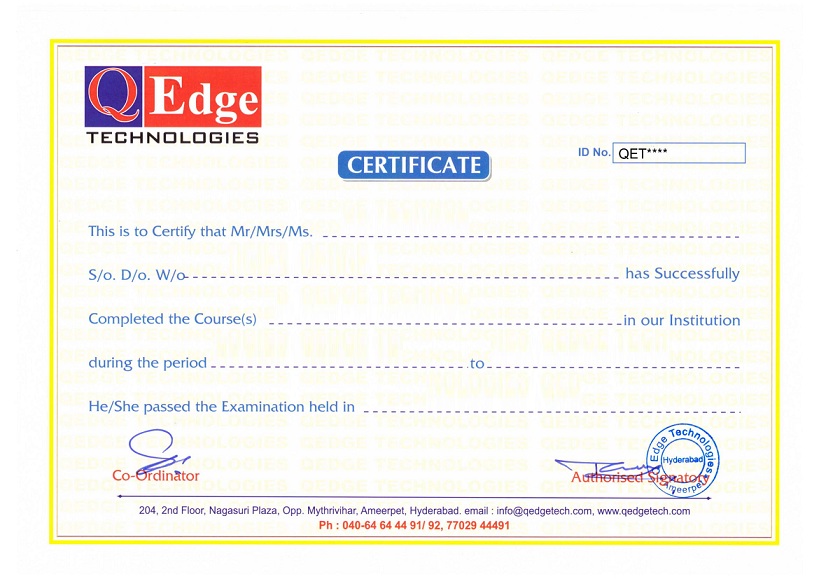
Structure your learning and get a certificate to prove it.








Our DevOps Training in Hyderabad is of 4 months duration.
Daily 1.5 hour theory + 1.5 hour practical session.
Monday to Saturday Sessions.
The DevOps project work in this course entails several key components. Firstly, students will be tasked with setting up a comprehensive LAMP (Linux, Apache, MySQL, PHP) environment. This involves installing and configuring each component to ensure seamless integration and optimal performance.
Additionally, the project work requires students to meticulously configure the web, database, and application layers within the LAMP environment. This step involves fine-tuning various settings and aligning them with specific project requirements to guarantee smooth functionality and efficient data processing.
Furthermore, the implementation of system monitoring tools is an important aspect of the project work. Students will learn how to select and deploy appropriate monitoring solutions to ensure the continuous tracking and analysis of the LAMP environment’s performance. This enables prompt identification and resolution of any issues that may arise during system operation.
Overall, this project work provides students with the opportunity to apply their knowledge of DevOps concepts and tools in a practical setting. By undertaking this real-world scenario, students can gain valuable hands-on experience in the various stages of DevOps project development.
In DevOps, build automation is implemented through the use of Maven. Maven is a powerful tool that is specifically designed for build automation purposes. It provides a structured approach to managing and organizing projects, making it an ideal choice for DevOps teams.
To implement build automation using Maven, participants in the DevOps training are introduced to its core concepts and functionality. They learn about the structure and phases of Maven, gaining an understanding of how Maven manages the build process. This includes learning about the various lifecycle phases that Maven supports, such as compilation, testing, packaging, and deployment.
Installing Maven is an essential step in the build automation process. The training covers the detailed steps needed to install Maven on different operating systems, ensuring that participants have the tools necessary for successful build automation.
Configuration is another important aspect of implementing build automation with Maven. Participants learn how to configure Maven to suit their specific project requirements. This includes setting up dependencies, repositories, and plugins, among other configurations.
In addition to understanding Maven’s structure and configuration, participants also learn about the commonly used jar/war project structure in build automation. This structure provides guidelines on organizing the source code and resources within a project, enabling efficient build automation and deployment.
By mastering Maven and its associated concepts, participants in the DevOps training gain the knowledge and skills needed to effectively implement build automation. This prepares them to streamline the build process, improving the efficiency and reliability of software development within the DevOps environment.
In DevOps, environments refer to distinct spaces or configurations where applications and software are developed, tested, and deployed. These environments serve different purposes throughout the software development lifecycle. Four common types of environments in DevOps are:
1. Development Environment: This environment is used by developers to write, modify, and test code. It provides a space for programmers to work on individual components of a software application without affecting the main production environment. Developers can experiment, collaborate, and ensure that the code functions as intended in this controlled environment.
2. Testing Environment: Once the development phase is complete, the software moves to the testing environment. Here, Quality Assurance (QA) engineers thoroughly test the application for bugs, errors, and potential issues. Various types of testing, such as unit testing, integration testing, and performance testing, are conducted in this environment to ensure the application meets the desired quality standards.
3. Staging Environment: After successful testing, the software is deployed to the staging environment. This environment closely resembles the production environment and serves as a final checkpoint before the software is released to end-users. The staging environment allows for additional testing and validation, enabling teams to verify the application’s performance and functionality in an environment that closely mirrors the production setup.
4. Production Environment: The production environment is the live or operational environment where the software is made available to end-users. It is a fully functioning system that reflects the actual user experience. The production environment is carefully configured to optimize reliability, security, and performance. Continuous monitoring and maintenance are crucial in this environment to promptly respond to any issues that may arise.
By utilizing different environments, DevOps teams can ensure a systematic and thorough approach to software development, from initial development to final deployment. This segregation of environments allows teams to maintain control, conduct comprehensive testing, minimize risks, and deliver high-quality software to end-users.
Yes, you are going to work on real-time projects during learning to gain real-time projects experience.
The revision control system used in DevOps is Git. Git is a powerful tool that allows for effective management of code and version control. It supports features such as local and remote repositories, branching, merging, cloning, fetching, pulling, and the installation of Git Server. With Git, developers can collaborate seamlessly, track changes, and safely manage multiple versions of their codebase. Its popularity and flexibility make it the preferred revision control system in the world of DevOps.
The course covers a range of automation concepts that are essential for streamlining and optimizing various processes. These concepts include:
1. Operating System Basics: Understanding the fundamentals of operating systems is crucial for automation. Students will learn about different operating system components and their roles in automating tasks.
2. Scripting Introduction: This module introduces students to the basics of scripting languages. They will learn about the syntax, variables, data types, and control structures required to write efficient scripts.
3. Shell Scripting: Shell scripting is a key aspect of automation. Students will gain a comprehensive understanding of shell scripting languages, such as Bash, and learn how to automate repetitive tasks by writing scripts.
4. Database Concepts: Automation often involves working with databases. This section covers fundamental database concepts, including data manipulation, querying, and scripting to automate database-related tasks.
5. Shell Variables, Decision Making, and Shell Test Conditions: Automating tasks requires the ability to handle variables, make decisions based on conditions, and test different scenarios. Students will learn how to utilize shell variables, implement decision-making logic, and perform effective shell test conditions.
6. Shell Loops, Redirection, and Exit Status: Loops are essential in automation to execute repetitive tasks. This module provides a deep understanding of different loop structures available in shell scripting. Additionally, students will master the redirection of input and output streams to automate data processing. Understanding and interpreting exit status codes will also be covered.
By completing this course, students will gain a strong foundation in automation concepts, enabling them to automate various tasks efficiently and effectively.
Installing WordPress with LAMP in a DevOps environment involves several steps.
First, an introduction to Vagrant is necessary. Vagrant is a tool used to create and manage development environments. It allows for easy configuration and reproducibility of virtual machines. Understanding Vagrant terminologies, such as boxes and provisioners, is essential.
Next, the installation of Vagrant is required. This can be done by downloading and installing the Vagrant software from the official website. Once installed, Vagrant can be used to manage the virtual machine on which WordPress will be hosted.
To enable WordPress installation with LAMP, the LAMP stack needs to be set up. LAMP stands for Linux, Apache, MySQL, and PHP. Linux is the operating system, Apache is the web server, MySQL is the database, and PHP is the programming language used for WordPress.
Once the LAMP stack is installed on the virtual machine, we can proceed with the installation of WordPress. WordPress is a widely used content management system (CMS) for building websites and blogs. It requires a PHP-compatible web server and a MySQL database. By utilizing the LAMP stack, all the necessary components are in place.
Additionally, Docker is another tool that can be utilized in DevOps for managing and deploying applications. With Docker, it is possible to create lightweight containers that encapsulate the application and its dependencies. Understanding Docker terminologies, such as images and containers, is important.
After Docker is installed, Docker images can be created for WordPress. These images contain all the necessary components and configurations to run a WordPress instance. Docker brings the advantage of portability and scalability, making it easier to manage WordPress installations across different environments.
In summary, installing WordPress with LAMP in a DevOps environment involves the utilization of tools like Vagrant and Docker. Vagrant helps set up and manage the virtual machine, while Docker enables the creation and deployment of lightweight containers for WordPress. With this approach, developers can easily manage and scale their WordPress installations in a reliable and reproducible manner.
After completion of training, you will receive a certificate of completion, which you can share with your friends, relatives, co-workers and potential employers.
Yes, you’ll be able to access your enrolled course materials through our Learning Management System. Practical Assignments, Day-to-Day Class videos and readings you can access through our LMS.
Structure your learning and get a certificate to prove it.
QEdge Technologies